
One of the first settings you will want to address with FlexSchedule/FlexBook is your provider setup. To navigate to your provider settings in Flex, enter your Flex settings, navigate to your FlexSchedule/FlexBook tab, and select the 'setup providers' button:
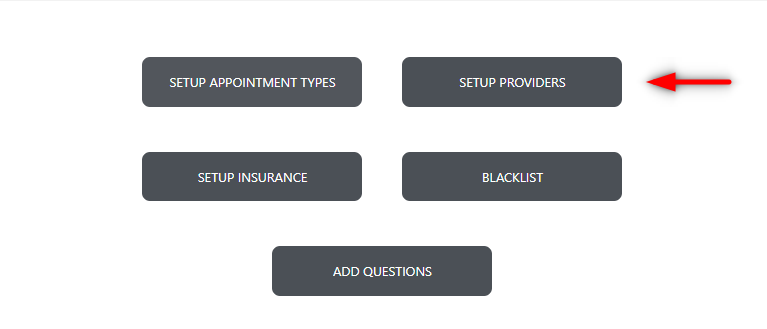
From here you'll see a window load which enables you to configure one or many providers.
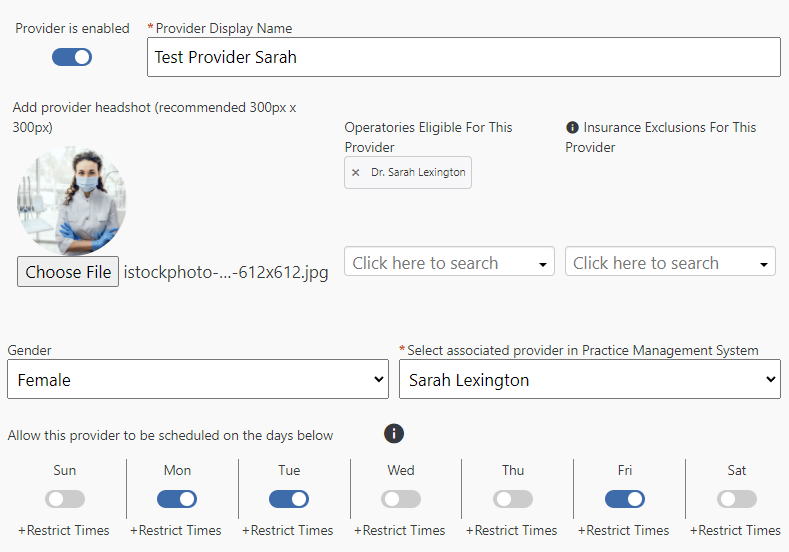
You have the ability to do the following:
- Enable/Disable each provider
- Provide a display name
- Attach a photo of the provider
- Choose the operatories the provider will be available for
- Enter any insurance the provider does not work with
- Gender selection
- Associate this provider with one from your practice management system
- Choose the providers eligibility (day(s) and time(s))
In my example below 'Test Provider Sarah' is available Monday, Tuesday, and Friday, in the 'Dr. Sarah Lexington' operatory only:
If you have questions after reading the material above, please comment below or contact Flex Support!
Thank you!
Comments
Please sign in to leave a comment.