
Flex allows you to set up to five recall reminders for your patients. You will need to configure your recall types and max days overdue by viewing the article here!
Once those general settings are in order, you will want to navigate to your Flex settings, select the 'texts & emails' tab, and choose the timeline sub-section:
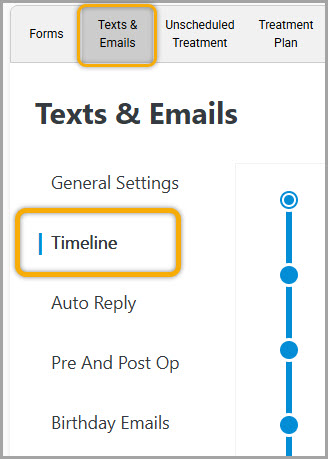
From here choose any of the five recall events. Once selected you will be provided with the following options:
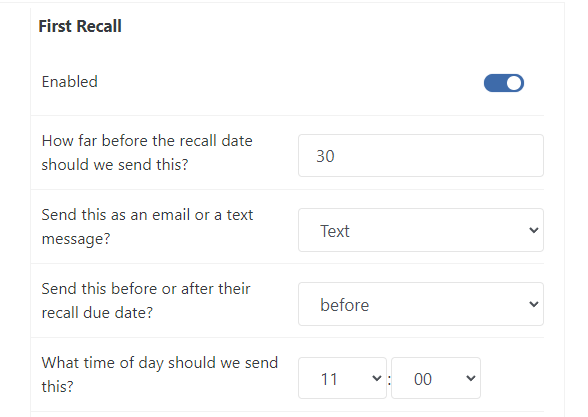
- Enable/Disable toggle
- Days before/after recall due date to send
- Method of sending (text/email)
- Time of day to send
- Edit text/email template (depending on method chosen)
You have the Flexibility to send all five recalls prior to the patient's due date, after the patient's due date, or a combination. You also have the ability disable/enable any combination of the five options.
Flex will read from the practice management systems recall due date for the recall types you have enabled in the general settings with the first link on this page.
In my example, I have enable the first recall to send out 30 days prior, via text, at 11:00 am.
If you have any questions after reviewing the material above, please contact support or comment below!
Thank you!
Comments
Please sign in to leave a comment.